
Table of Contents
Best MacBooks for Work & Design in 2026
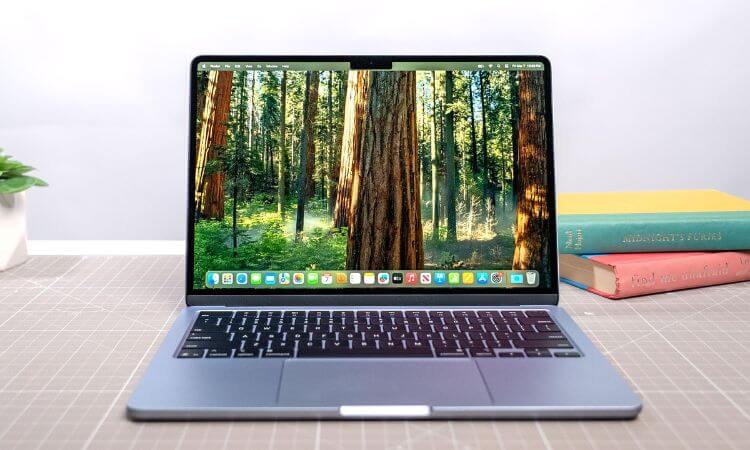
In 2026, Apple continues to dominate the laptop market with its sleek design, powerful M-series chips, and seamless integration across devices. Whether you’re a graphic designer, video editor, 3D artist, or business professional, the latest MacBook lineup offers something for everyone.
With the arrival of the M3, M3 Pro, and M3 Max chips, Apple’s notebooks have achieved record-breaking performance, combining efficiency with raw power. Choosing the right MacBook for work and design depends on your workload, budget, and portability needs.
To make your decision easier, we’ve compiled a list of the 10 best MacBooks for work and design in 2025, analyzing performance, display quality, battery life, and real-world usability for professionals.
1. MacBook Pro 16-inch (M3 Max)
The MacBook Pro 16-inch with M3 Max chip is the most powerful laptop Apple has ever made. It’s designed for heavy-duty professionals—3D artists, filmmakers, architects, and developers—who demand extreme performance.
Key Features:
- Chip: Apple M3 Max (up to 16-core CPU, 40-core GPU)
- Display: 16.2-inch Liquid Retina XDR, 120Hz ProMotion
- RAM: Up to 128GB unified memory
- Storage: Up to 8TB SSD
- Battery Life: Up to 22 hours
Why It’s Great for Designers:
Its Liquid Retina XDR display supports HDR and P3 wide color, ensuring color accuracy for photo and video editing. The M3 Max chip effortlessly handles demanding applications like Final Cut Pro, Blender, and Adobe After Effects.
✅ Pros: Unrivaled performance, exceptional display, long battery life
❌ Cons: Very expensive, slightly heavy for travel
DO NOT MISS: Apple M4 Chip Rumored for MacBooks in 2026 — Everything We Know So Far
🥈 2. MacBook Pro 14-inch (M3 Pro)
If you want desktop-class power in a more compact design, the MacBook Pro 14-inch (M3 Pro) strikes the perfect balance between portability and performance.
Key Features:
- Chip: Apple M3 Pro (up to 12-core CPU, 18-core GPU)
- Display: 14.2-inch Liquid Retina XDR
- RAM: Up to 36GB
- Storage: Up to 4TB
- Battery Life: 18 hours
Best For:
Graphic designers, photographers, developers, and video editors who need a powerful yet lightweight machine.
✅ Pros: Compact and portable, stunning display, powerful M3 Pro chip
❌ Cons: Gets pricey with maxed-out configurations
🥉 3. MacBook Air 15-inch (M3)
The MacBook Air 15-inch (M3) is a dream for creatives who need performance without bulk. It’s ideal for designers, students, and freelancers who want a balance of speed, battery life, and affordability.
Key Features:
- Chip: Apple M3 (8-core CPU, 10-core GPU)
- Display: 15.3-inch Liquid Retina
- RAM: Up to 24GB
- Storage: Up to 2TB SSD
- Battery Life: 18 hours
Why It’s Great:
With the M3 chip, it handles Photoshop, Illustrator, and Figma with ease while maintaining silent operation due to its fanless design.
✅ Pros: Lightweight, silent, great for multitasking
❌ Cons: Not for very heavy 3D rendering or 8K editing
4. MacBook Air 13-inch (M3)
For those who prioritize portability, the MacBook Air 13-inch (M3) is a compact powerhouse. It’s the lightest MacBook of 2025 and still packs impressive performance for everyday creative tasks.
Key Features:
- Chip: M3
- Display: 13.6-inch Liquid Retina
- RAM: Up to 24GB
- Storage: Up to 2TB
- Battery: 18 hours
Perfect For:
Writers, students, and designers who need a high-quality, lightweight laptop for sketching, presentations, and document design.
✅ Pros: Super portable, affordable, excellent battery
❌ Cons: Smaller display may not suit video editors
5. MacBook Pro 13-inch (M2, 2024 Edition)
Although not new, the MacBook Pro 13-inch with M2 remains a fantastic value in 2025. It’s compact, efficient, and has the iconic Touch Bar for quick creative controls.
Key Features:
- Chip: M2
- Display: 13.3-inch Retina
- RAM: Up to 24GB
- Storage: Up to 2TB
- Battery Life: 20 hours
Why It’s Still Worth It:
Great for light to medium design tasks like photo editing, poster creation, and coding.
✅ Pros: Touch Bar features, compact size, excellent battery
❌ Cons: Outperformed by M3 models
6. MacBook Pro 16-inch (M2 Pro/Max, 2024 Edition)
If you want pro-level power without paying 2025 prices, the MacBook Pro 16-inch (M2 Pro/Max) is still a beast. Many professionals continue to use it for its reliability and unmatched screen.
Key Features:
- Chip: M2 Pro / M2 Max
- Display: 16.2-inch Liquid Retina XDR
- RAM: Up to 96GB
- Battery: 22 hours
Perfect For:
Video editors, animators, and music producers need consistent high performance.
✅ Pros: Great display, strong performance, still relevant
❌ Cons: Slightly heavier than newer versions
7. MacBook Air M2 (2023)
Still one of Apple’s most popular models, the MacBook Air M2 delivers premium performance and design for a mid-range price. It’s a great option for professionals who want reliability without breaking the bank.
Key Features:
- Chip: M2
- Display: 13.6-inch Retina
- RAM: Up to 24GB
- Storage: Up to 2TB
- Battery Life: 18 hours
✅ Pros: Affordable yet powerful, great build quality
❌ Cons: Lacks ProMotion display
8. MacBook Pro 14-inch (M2 Pro, 2024)
The MacBook Pro 14-inch M2 Pro remains a fantastic option in 2025 for professional workflows. It offers high performance and a stunning display at a more accessible price than the M3 Pro version.
Key Features:
- Chip: M2 Pro
- Display: 14.2-inch Liquid Retina XDR
- Battery Life: 18 hours
✅ Pros: Excellent display, lower cost than M3 Pro
❌ Cons: Slightly shorter lifespan compared to M3 chips
9. MacBook Pro 15-inch (M3, 2025)
New for 2025, the MacBook Pro 15-inch M3 bridges the gap between Air and Pro. It’s ideal for designers and developers who want performance with portability.
Key Features:
- Chip: M3
- Display: 15.3-inch Retina
- RAM: Up to 24GB
- Battery Life: 19 hours
✅ Pros: Perfect middle ground, stunning design
❌ Cons: Limited GPU compared to Pro models
10. Refurbished MacBook Pro 2021 (M1 Pro/Max)
If you’re on a budget but still want top-tier design performance, the refurbished MacBook Pro (M1 Pro/Max) is an excellent pick. It still runs the latest macOS updates and handles creative apps well.
✅ Pros: Budget-friendly, great display
❌ Cons: Older chip
Buying Guide: How to Choose the Best MacBook for Work & Design
When selecting the perfect MacBook, consider these key factors:
1. Chip Performance
- M3/M3 Pro/M3 Max: Best for professionals and creators
- M2/M2 Pro: Excellent mid-range choice
- M1: Still good for basic design and office tasks
2. Display Quality
Designers should prioritize Liquid Retina XDR displays with P3 wide color gamut for accurate visuals.
3. RAM & Storage
- Minimum RAM: 16GB for design and editing
- Storage: 512GB or higher recommended for large files
4. Portability
If you travel often, opt for MacBook Air (M3) or MacBook Pro 14-inch—both offer power in a compact frame.
5. Battery Life
MacBooks are famous for endurance—expect 18–22 hours on the latest models, depending on workload.
MacBook for Designers: Software Compatibility
Apple’s M-series chips run creative software faster than ever. Here’s what designers can expect in 2026:
- Graphic Design: Adobe Photoshop, Illustrator, CorelDRAW
- Video Editing: Final Cut Pro, Premiere Pro, DaVinci Resolve
- 3D Design: Blender, Cinema 4D, Maya
- UI/UX Design: Figma, Sketch, XD
All these apps run natively on M3 chips, offering faster render times and better energy efficiency.
Battery Life & Portability
Apple’s efficient chips mean you can work all day without charging. The MacBook Air M3, for instance, delivers up to 18 hours, while the MacBook Pro 16-inch can stretch to 22 hours, making them ideal for long creative sessions.
Why Designers Prefer MacBooks
- Accurate color display (P3 wide gamut)
- Optimized creative apps
- Quiet performance
- Excellent build quality
- Long-term software support
💬 FAQs
Q1. Which MacBook is best for professional graphic design in 2026?
👉 The MacBook Pro 16-inch (M3 Max) is the ultimate machine for professional designers and video editors.
Q2. What’s the most budget-friendly MacBook for creative work?
👉 The MacBook Air 13-inch (M3) offers great performance at a reasonable price.
Q3. Is the M2 MacBook still worth buying in 2025?
👉 Yes, M2 models remain great for everyday creative tasks and general productivity.
Q4. Which MacBook is best for video editing?
👉 The MacBook Pro 16-inch (M3 Max) or 14-inch (M3 Pro) are ideal for high-resolution video work.
Q5. Should I wait for the M4 MacBook?
👉 The M3 lineup already offers powerful performance; most users won’t need to wait unless seeking cutting-edge GPU upgrades.
Conclusion
In 2026, Apple has crafted a MacBook lineup that caters to every type of user—from light designers to professional content creators.
If you want the best of the best, go for the MacBook Pro 16-inch (M3 Max).
For portability and power, the MacBook Pro 14-inch (M3 Pro) is unbeatable.
And if you’re on a budget, the MacBook Air 15-inch (M3) gives you incredible value.
No matter which you choose, Apple’s 2025 MacBooks guarantee seamless design performance, longevity, and elegance—making them the perfect partners for creative and professional excellence.