
Table of Contents
Google Maps Adds Augmented Reality Navigation in 2026
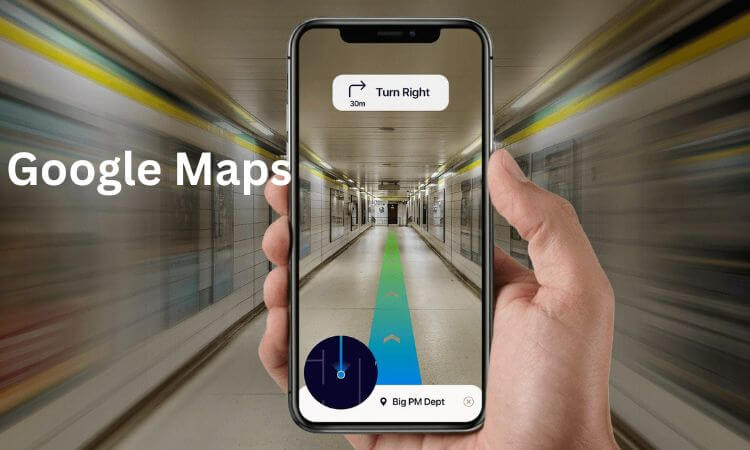
Imagine walking through a busy city with your phone camera pointing ahead and seeing arrows, street names, and directions displayed directly over the buildings and roads around you. No need to guess where to turn — your route literally appears on your screen, in the real world.
That futuristic idea is becoming a reality. In 2026, Google Maps is officially integrating augmented reality (AR) navigation into its core app experience. This means users will soon be able to see live visual directions overlaid on their surroundings — whether walking, driving, or even navigating inside airports and shopping malls.
Let’s explore what this breakthrough means, how it works, and what to expect from the rollout.
Evolution of Google Maps: From Live View to Full AR
Google Maps has come a long way since introducing Live View, the experimental feature that used your phone’s camera to overlay walking directions on top of real-world scenes. While Live View helped users find their way in complex areas, it was limited to short routes and specific cities.
By 2026, Google has enhanced the underlying technology behind Live View and Immersive View, combining Street View, aerial imagery, and 3D mapping. With these advancements — plus the power of Google’s AI assistant, Gemini — AR navigation can now deliver real-time, accurate, and visually integrated guidance for pedestrians, indoor travelers, and even drivers in select regions.
DO NOT MISS: Best MacBooks for Work & Design in 2026
Key Features of Google Maps AR Navigation in 2026
1. Real-Time AR Turn-by-Turn Guidance
Users can now hold up their phones and follow arrows, lines, and markers projected on the streets and buildings ahead. Each turn, intersection, and destination appears in its actual physical location, eliminating confusion about which way to go.
2. Indoor Navigation Made Simple
Google Maps AR will now work indoors — guiding users through airports, train stations, universities, and shopping malls. Arrows and signs appear over hallways and doors, showing you where to go, even when GPS signals are weak.
3. Voice and AI Integration with Gemini
Google’s Gemini AI assistant enhances navigation by allowing natural voice commands such as:
- “Show me the fastest route avoiding stairs.”
- “Take me to Gate B12.”
- “Find a café near my path.”
Gemini understands your request and overlays personalized visual instructions directly in AR view.
4. Wearable and Smart Glasses Support
In addition to smartphones, Google’s AR navigation will integrate with Wear OS devices and upcoming smart glasses. This hands-free experience allows users to receive subtle visual prompts and vibrations for turns, keeping their eyes on the road or path.
5. Developer Access and Custom AR Content
Google is opening its Maps Platform for developers to build AR experiences for landmarks, museums, and public spaces. Imagine walking through a historic district where your phone highlights monuments and displays facts in real-time — all powered by AR navigation technology.
How It Works
Google’s AR navigation uses a combination of:
- Street View and 3D maps for spatial awareness.
- AI-based computer vision to match real-time camera feeds with its image database.
- Real-world positioning (RWP) that improves accuracy beyond traditional GPS.
- Gemini AI to interpret commands and predict your intended routes.
Together, these components make it possible for Google Maps to understand exactly where you are and where you’re looking, allowing it to overlay directions and information in the right place on your screen.
Rollout and Device Compatibility
The feature will roll out in stages during 2026, starting with Pixel and high-end Android smartphones, followed by iOS and Wear OS devices.
Countries with dense Street View coverage and major urban centers — such as the United States, Japan, the UK, and parts of Europe and Asia — will be the first to experience the update. More regions will follow throughout the year.
Privacy and Safety Considerations
Since AR navigation uses your camera and location data, Google emphasizes strong privacy controls and on-device processing. Users will have the option to enable or disable camera-based navigation anytime.
Safety is also a priority. To prevent accidents, the app will remind users to lower their phones while walking through intersections or crossing streets. For drivers, AR prompts will appear in minimal, distraction-free formats.
Benefits of AR Navigation
- No More Wrong Turns: Directions appear exactly where they’re needed — at your eye level.
- Stress-Free Indoor Travel: Easily locate gates, stores, or exits without getting lost.
- Enhanced Accessibility: AR can assist people with mobility challenges by highlighting ramps, elevators, or accessible routes.
- Tourism Boost: Landmarks and attractions can display digital guides or history notes through AR overlays.
- Improved Delivery and Ride-Sharing: Drivers can find precise pick-up or drop-off spots instantly.
Challenges and Limitations
Despite its promise, AR navigation faces some challenges:
- Hardware Compatibility: Not all smartphones can handle the processing power required for real-time AR rendering.
- Battery Usage: Continuous camera and GPS use can drain battery life faster.
- Coverage Gaps: AR navigation may be limited in rural or unmapped areas.
- Regulatory Concerns: Some regions may impose restrictions on camera-based driving aids.
Nonetheless, Google is working to optimize performance and expand coverage as the technology matures.
Why This Matters
Google’s 2026 AR navigation update marks a significant leap toward merging the physical and digital worlds. It turns Maps into more than a navigation app — it becomes a visual companion that understands and interacts with your environment in real time.
For daily commuters, tourists, and businesses alike, this feature brings a new level of convenience and engagement to the way we move, explore, and connect.
Conclusion
The launch of Google Maps AR Navigation in 2026 is more than just a tech upgrade — it’s a reimagining of how humans interact with maps and spaces. With the blend of AI, real-time camera vision, and immersive 3D overlays, Google Maps is evolving into a truly intelligent, visual guide for the modern world.
Whether you’re finding your way through a crowded airport, navigating a complex city, or exploring a new country, AR navigation ensures you’ll never take the wrong turn again.
FAQs
Q1: Is AR navigation replacing the normal Google Maps view?
No. AR navigation is an optional feature designed to complement traditional map and voice guidance. You can switch between AR and map views anytime.
Q2: Will AR navigation work offline?
Some basic routes can be saved offline, but full AR functionality requires an internet connection for real-time visuals and positioning.
Q3: When will the feature be available worldwide?
Google plans to release AR navigation gradually throughout 2026, starting with major cities and supported devices.
Q4: Can I use AR navigation while driving?
Yes, but in limited, safety-optimized form. The app provides minimal on-screen cues to prevent distraction while driving.
Q5: Which devices will support it first?
Google’s Pixel phones, high-end Android devices, and eventually iPhones and Wear OS watches will support AR navigation.